Setting Permissions
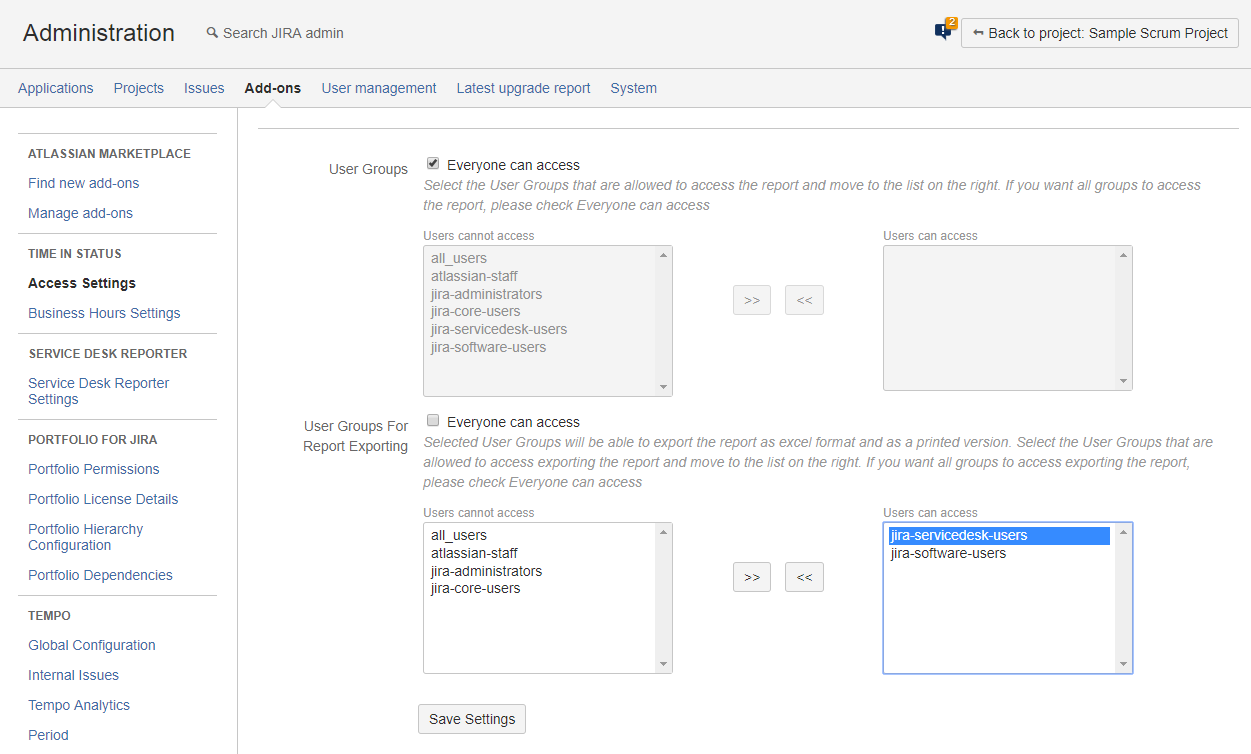
Using the Access settings page you can set which users can access and which users can export data from Time in Status.
To change Access Settings:
-
Open Administration >> Add-ons >> Time in Status >> Access Settings page.
-
On this screen you can set the user groups that can access Time in Status and user groups that can export data from Time in Status.
-
User Groups section lets you select the user groups that can access Time in Status reports.
-
User Groups for Report Exporting section lets you select the user groups that can export data from Time in Status.
-
Export permission is available as a separate permission because taking exports might be hard on the server if you have a large number of issues and/or long issue histories.
-
-
You need to click on Save Settings after making the necessary changes on access settings.