
The Permissions page allows Jira Administrators to control who can access and use TicketBook at the app level. These are global settings that apply across the entire app and work as the first layer of access control, before any contract-level permissions come into play.
Setting permissions correctly from the start ensures that sensitive contract data is only visible to the right people, and that only trusted users can create and configure new contracts.
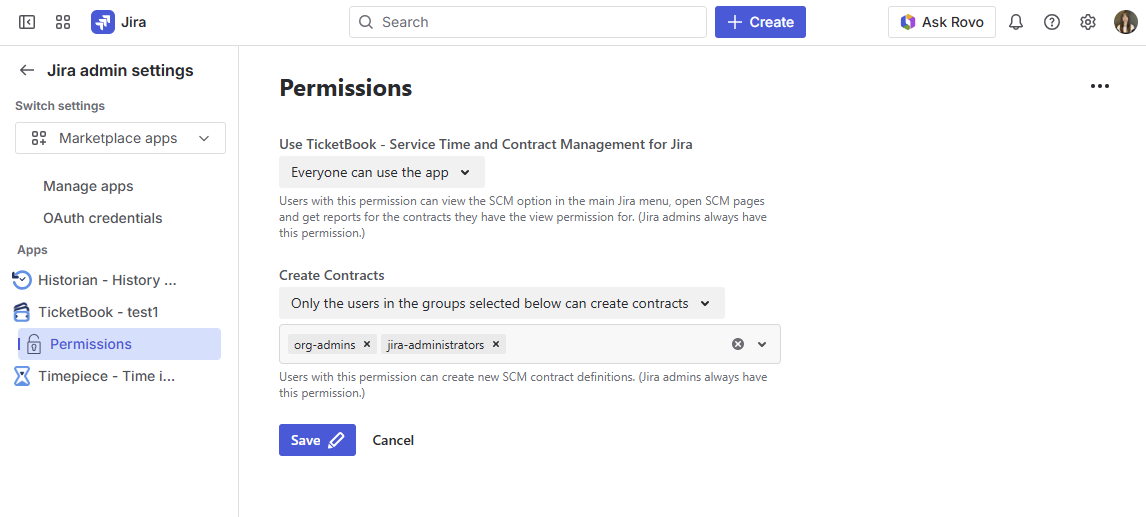
Accessing the Permissions Page
The Permissions page can be found under:
Jira Admin Settings → Marketplace Apps → TicketBook → Permissions
Only Jira Administrators can access this page and modify these settings.
Permission Settings
Using the Permissions page, you can configure two global permission settings:
Users Who Can View Contracts and Contract Reports
This setting defines who has access to TicketBook at the app level. Users included here will be able to:
-
See the TicketBook link under the Apps menu in the Jira navigation
-
View contracts they have been granted access to
-
Run Contract Reports, SLA List Reports, and SLA Success Rate Reports
This is the global gate for TicketBook access. If a user is not included here, they will not be able to see or interact with any part of the app — even if they have been granted view access on a specific contract.
You can grant this permission to individual users, Jira groups, or project roles, giving you flexibility in how access is managed across your organization.
Users Who Can Create New Contracts
This setting defines who is allowed to create and configure new contracts in TicketBook. Users included here will be able to:
-
Create new contracts from the Contract Definitions screen
-
Configure contract settings, clauses, and permissions on contracts they own or have edit access to
This permission is typically granted to a smaller group of users, such as account managers, service delivery leads, or Jira administrators, who are responsible for setting up and maintaining service agreements.
Having create permission does not automatically grant view access to all contracts. A user who can create contracts can only view contracts they have been specifically granted access to, either through global view permissions or contract-level permissions.
Jira Administrators
Jira Administrators always have both view and create permissions on all contracts, regardless of what is configured on the Permissions page. This ensures that administrators can always access and manage any contract, including recovering access if a configuration mistake accidentally restricts all non-admin users from a contract.
How Global and Contract-Level Permissions Work Together
TicketBook uses a two-layer permission model:
-
Global permissions (this page) — control who can access the app and who can create contracts
-
Contract-level permissions (configured on each contract's Permissions tab) — control who can view or edit a specific contract
A user must satisfy both layers to access a contract. For details on configuring access at the contract level, see Contract Permissions.