
What is a Contract?
A contract in TicketBook represents a service agreement between two parties, typically a service provider and a customer, or a business and a vendor. It defines the rules, quotas, and goals that both sides have agreed upon for a given time period.
Instead of keeping this agreement in a PDF or a spreadsheet, TicketBook brings it directly into Jira. Once a contract is defined, TicketBook automatically tracks consumption against it in real time, no manual reporting required.
What Can a Contract Track?
Each contract is built around one or more Clauses. A clause defines a specific quota or goal for a group of Jira issues. Depending on your service agreement, a contract can track:
-
Number of issues — how many support tickets a customer can raise per period
-
Total service hours — how many hours of work can be logged against a customer's issues per period
-
SLA success rates — whether your team is meeting the SLA targets defined in Jira Service Management
-
Credits — a custom numeric value that controls how much of a credit-based quota is consumed per issue
A single contract can contain multiple clauses of different types, giving you full flexibility to mirror the exact terms of your real-world service agreement.
Contract Periods
Every contract is divided into periods, defined time intervals over which quota consumption is measured and reported. TicketBook supports monthly, annual, and fixed-period contracts, giving you the flexibility to match your billing or service cycles.
At the end of each period, TicketBook calculates whether the quotas and goals defined in each clause were met, exceeded, or missed. Optionally, unused quota can be carried over to the next period, or over-consumed periods can borrow from future ones.
Contract Definitions Screen
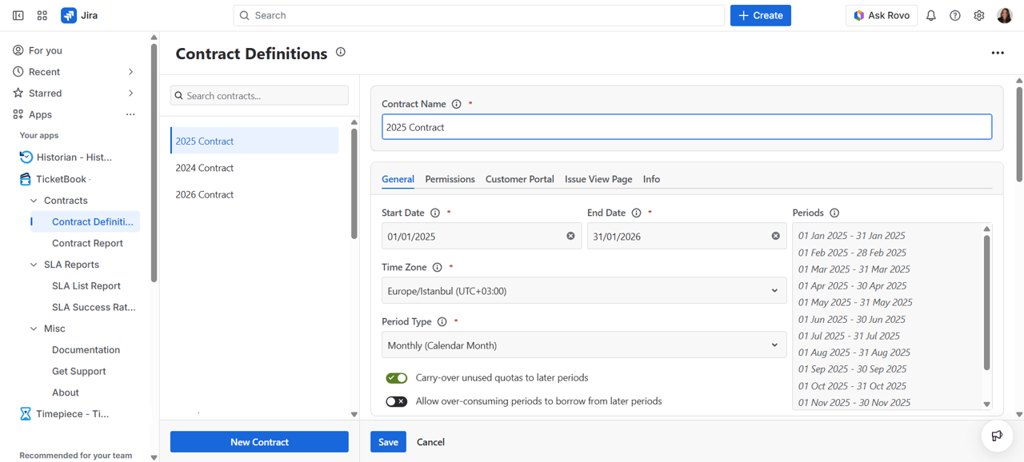
The Contract Definitions screen is the main screen for creating and managing contracts. From this screen you can view all existing contracts, create new ones, and open any contract to edit its settings, clauses, and permissions.
Contract Configuration
Each contract in TicketBook is configured across several tabs. The pages below cover each part of the contract configuration in detail:
-
Contract Definition — Set the contract name, dates, time zone, period type, and carry-over settings
-
Clauses — Define the quotas and goals that make up the contract, using JQL to scope each clause to the right issues
-
Contract Permissions — Control which users can view or edit this specific contract
-
Customer Portal Panel — Configure whether and how the contract's current period summary is shown to customers in the JSM Help Center and project portals
-
Issue View Page Panel — Configure whether and how the contract's current period summary is shown to agents on Jira issue view pages
-
Info — View the contract's ownership and change history