
TicketBook allows you to configure Contract Permissions to provide more granular control over who can access and manage individual contracts. These permissions work at the contract level, meaning each contract can have its own independent set of access rules on top of the global app-level permissions.
This is particularly useful when your Jira site manages contracts for multiple customers or vendors, and you want to ensure that users can only see the contracts that are relevant to them.
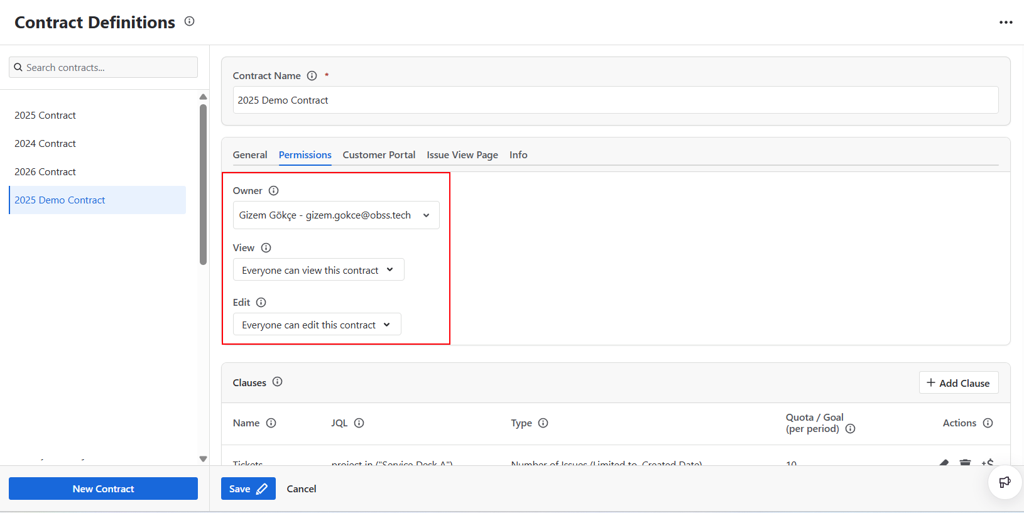
Permission Roles
Using the Permissions tab, you can define three levels of access for each contract:
Owner
The Owner is a single user who is designated as the primary responsible person for the contract. The owner:
-
Always has full View and Edit permissions on the contract
-
Is the only non-admin user who can delete the contract
-
Is displayed on the contract's Info tab for easy reference
The owner is typically the account manager or team lead responsible for the customer relationship associated with that contract.
View Permission
Users or groups granted View permission can:
-
See the contract and its details in the Contract Definitions screen
-
Run Contract Reports based on this contract
-
See the contract's current period summary on the Issue View Page panel and Customer Portal panel, if those are configured
This permission is suitable for users who need visibility into contract status but should not be able to make changes.
Edit Permission
Users or groups granted Edit permission can:
-
Modify the contract's general settings, dates, and period type
-
Add, edit, or delete clauses
-
Add or remove amends
-
Update the contract's permission settings
This permission is suitable for users who are actively managing the contract.
Relationship with Global Permissions
Contract-level permissions work alongside the global app-level permissions, not independently of them. A user must first have global view access to TicketBook before contract-level view permissions apply. If a user does not have global access to the app, they will not be able to see any contracts regardless of what is configured at the contract level.
For details on setting global app-level permissions, see Permissions.