
What is a Clause?
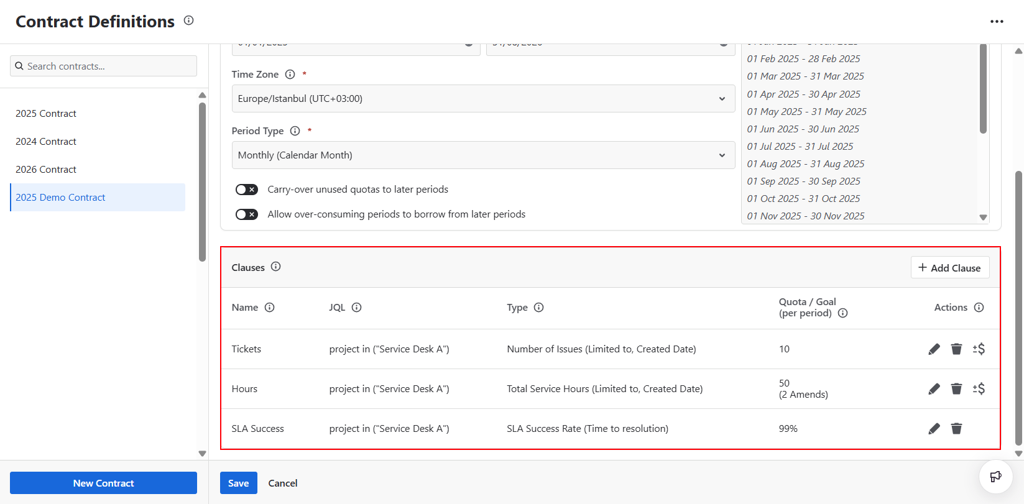
A clause is the building block of a contract. Each contract has one or more clauses, and each clause defines a specific quota or goal for a group of Jira issues. Together, the clauses of a contract represent the full set of commitments both parties have agreed to, such as how many tickets a customer can raise, how many hours a vendor can log, or what SLA success rate a service team must maintain.
Because a single contract can contain multiple clauses, you have the flexibility to mirror even complex real-world service agreements exactly as they are written.
Adding a new Clause
You can add a new clause to your contract by clicking the Add New Clause button.
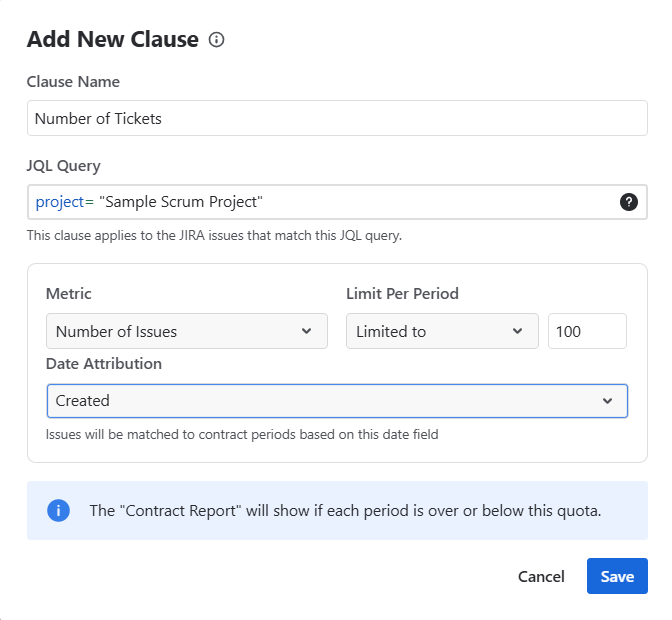
This action opens the Clause dialog where you can define the details of the clause.
Name
Each clause has a Name. This name will be used to identify the clause in Contract Reports, so it is recommended to use something descriptive that reflects the scope or purpose of the clause.
JQL
Each clause includes a JQL query that defines the scope of issues included in that clause. The JQL is evaluated separately for each contract period. For every period, TicketBook checks the issues created during that period and determines whether they match the defined JQL. Only matching issues are counted within the clause.
Any JQL supported by Jira can be used. This gives you precise control over which issues are in scope, you can filter by project, issue type, priority, customer, component, or any other Jira field.
The Clause dialog allows saving invalid JQL queries as well. This ensures that user permission limitations do not block contract creation, even if the user cannot validate the JQL at that moment.
Clause Type
There are 4 types of clauses:
-
Number of Issues: This clause type sets a limit for the number of issues that can be created in each period.
-
If the number of issues created in a period matching the clause's JQL is within the defined limit, the clause will show as Success for that period.
-
If the number exceeds the limit, the clause will show as Fail for that period.
This is the most straightforward clause type and is typically used when a contract limits how many support requests a customer can raise per month.
-
-
Total Service Hours: This clause type sets a limit for the total number of service hours that can be logged in a period.
-
The service hours are taken directly from the work logged onto Jira issues created in each period.
-
If the total exceeds the limit, the clause will show as Fail for that period.
This clause type is ideal for contracts where the agreement is based on time rather than ticket volume, for example, a retainer where a customer purchases a fixed number of consulting or support hours per month.
-
-
SLA Success Rate: This clause type sets a target success rate for one or more Jira Service Management SLA timers.
-
TicketBook does not run its own SLA timers. The SLA timers used here are Jira Service Management's native SLAs.
-
The SLA Success Rate is calculated as the number of issues with successful SLA timers divided by the total number of issues created in the period matching the clause's JQL.
-
If more than one SLA timer is selected for this clause, all selected SLA timers must be successful for an issue to count as a success. If at least one SLA timer is breached on an issue, that issue counts as a failure.
-
The default target is 100%, but you can reduce this to reflect a contracted tolerance for SLA breaches, for example, 99.5%.
-
If the SLA success rate in a period is equal to or higher than the target, the clause will show as Success. If it falls below the target, the clause will show as Fail.
This clause type is useful when your service agreement includes a guaranteed response or resolution time, and you need to track and report on whether those commitments are being met.
-
-
Credit: This clause type sets a limit for the total credit amount that can be consumed in each period.
-
A numeric custom field must be selected when defining this clause. The credit amount is taken directly from the value of this field on each Jira issue created in the period.
-
Instead of counting each issue as 1 (as with the Number of Issues clause type), TicketBook sums the selected field's values across all matching issues.
-
Each issue may consume a different amount of credit depending on the value stored in the selected field.
-
If the total credit consumed in a period is within the defined limit, the clause will show as Success. If it exceeds the limit, it will show as Fail.
-
Only numeric custom fields can be selected for this clause type. System estimation fields such as Story Points are not included in the selection list.
This clause type is useful when different issues have different weights or costs, for example, when different request types consume different amounts of a customer's prepaid credit balance.
-
Limited vs. Unlimited
By default, clauses are Limited and require you to set a specific quota or target. The Contract Report will then calculate whether each period is within or over that limit, and display the result as Success or Fail accordingly.
The Number of Issues and Total Service Hours clause types can also be configured as Unlimited. In this case, the Contract Report will still calculate and display the total consumption for each period, but periods will always show as Success regardless of how much was consumed. This is useful when you want to track usage for visibility purposes without enforcing a hard cap.
Amends
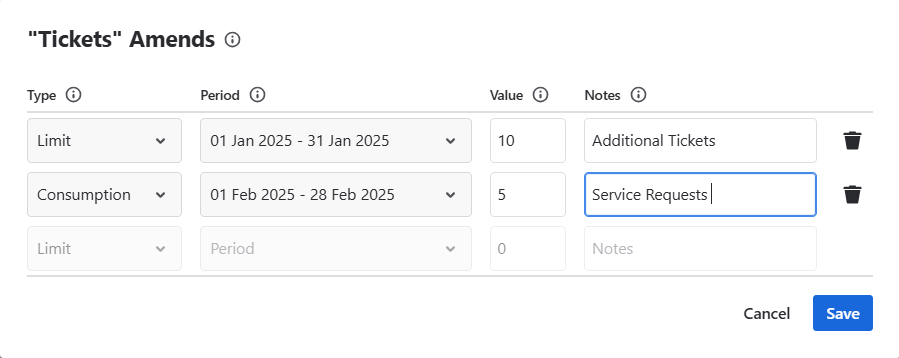
Amends allow you to define additional quota or additional consumption for a specific period of a clause. They are used to handle real-world situations that fall outside the standard contract terms.
Two common scenarios where amends are useful:
-
A customer is going through an unusually busy period and wants to purchase extra quota for that month only, this can be recorded as a Limit amend, increasing the available quota for that period.
-
Some work was delivered as part of the contract but was not recorded as a Jira issue, for example, a phone consultation or an off-system task. This can be recorded as a Consumption amend, adding to the consumed quota for that period without requiring a Jira issue.
To add an amend, click the Amends button next to a clause in the list to open the Amends popup.
Each amend has the following properties:
-
Type — either a Limit (adds to the quota) or a Consumption (adds to the consumption)
-
Period — the specific contract period the amend applies to
-
Value — a numeric amount that is added to the limit or consumption for that period
-
Notes — a free text field where you can explain the reason for the amend. These notes will be visible in the Contract Report.
Amends are available for Number of Issues, Total Service Hours, and Credit clause types only. They are not applicable to SLA Success Rate clauses.