
TicketBook allows you to display the current period summary report of a contract directly on Jira issue view pages. This gives your service desk agents real-time visibility into a customer's contract status while they are working on a ticket, without having to leave the issue or navigate to a separate report.
When agents can see how much of a customer's quota has been consumed at a glance, they can make better decisions about prioritization, communicate more accurately with customers, and avoid accidentally exceeding contract limits without anyone noticing.
Configuration
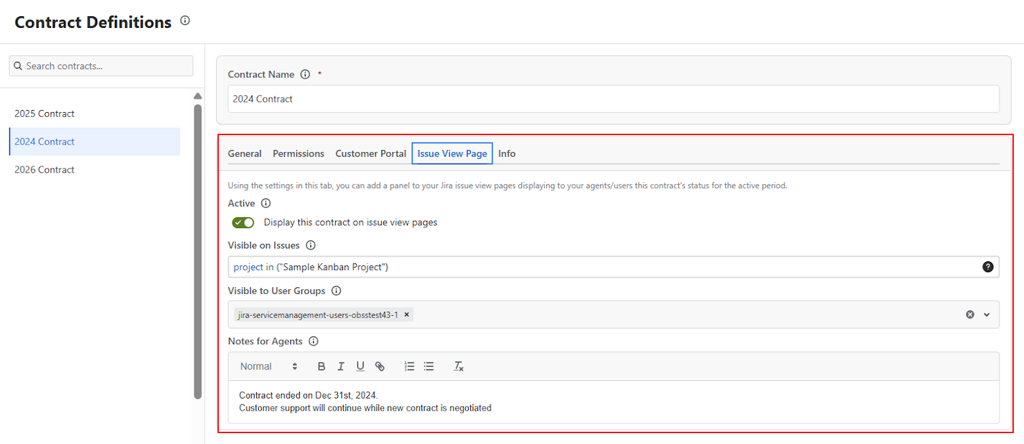
Using the Issue View Page tab in the Contract Definition screen, the following settings can be configured:
Enable or Disable the Issue View Page Panel
Toggle whether the contract's current period summary report should appear on issue view pages. When disabled, no panel will be shown to any agent, regardless of other settings.
Select the Issues
Define which issues will display the contract's panel using a JQL query. The panel will only appear on issue view pages for issues that match this JQL. This allows you to target the panel precisely, for example, showing a specific customer's contract data only on issues raised by that customer.
This is an important setting because a Jira site may have contracts for multiple customers. Without scoping the panel to the right issues, agents could see the wrong contract's data on unrelated tickets.
Set Visibility by User Groups
Determine which Jira user groups will be able to see the panel on issue view pages. This allows you to limit the panel to specific agent groups, for example, showing it only to the account managers or senior agents who need contract visibility, rather than all users who can view the issue.
Add a Note for Agents
Enter an optional free text note that will be displayed to JSM agents inside the panel on the issue view page. This is useful for providing agents with quick guidance, for example, reminding them of a specific policy related to that contract, or flagging that a customer is close to their quota limit.
The Panel
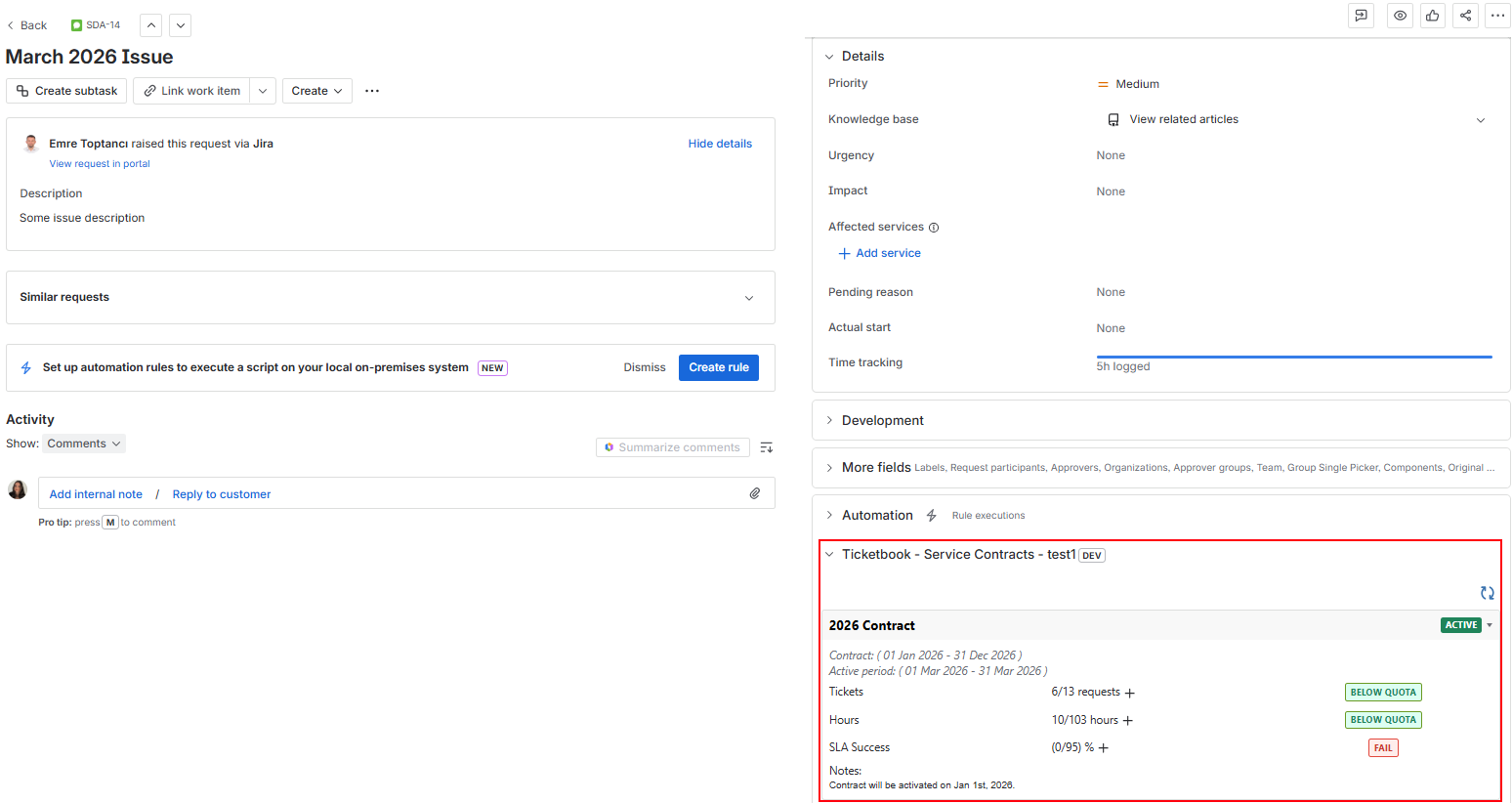
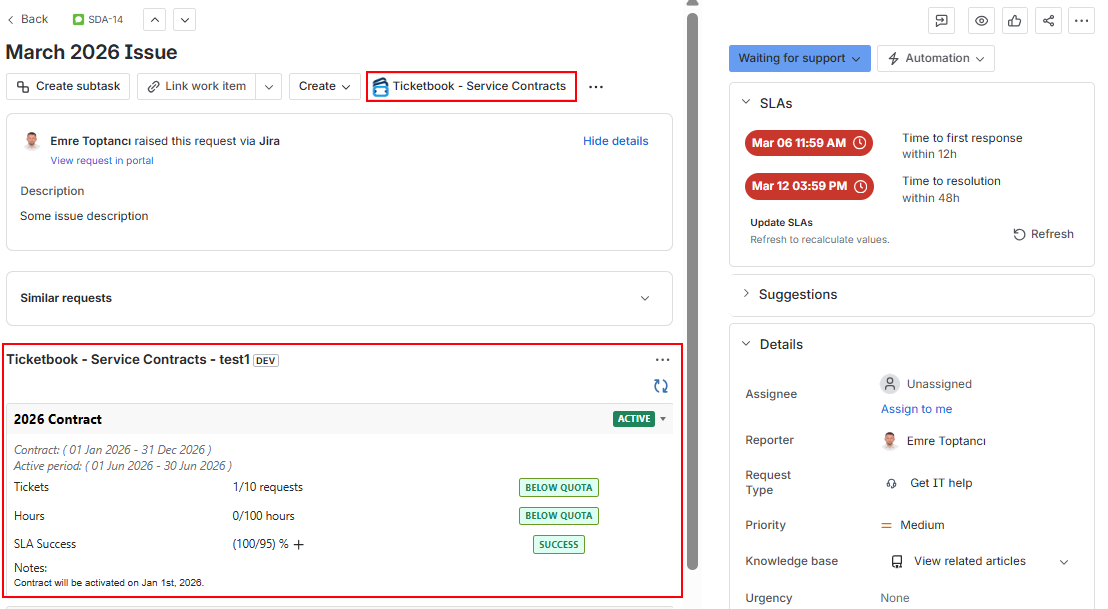
When the Issue View Page Panel is enabled for a contract and an issue matches the panel's JQL, authorized users will see the contract's current period summary report in a panel on the right side of the issue view page.
The panel displays clause-level consumption data for the current period, giving agents an immediate picture of where the customer stands against their contracted quotas at the moment they are handling the ticket.
Right Sidebar (Issue Context)
When the Right sidebar (Issue Context) option is selected in the page settings, the TicketBook section is displayed in the issue context panel on the right side of the issue view page.
Center panel (Issue Panel)
When the Center panel (Issue Panel) option is selected in the page settings, the TicketBook section is displayed in the main issue panel on the issue view page.
Why This Matters for Agents
Without this panel, an agent handling a support ticket has no way of knowing whether the customer is close to their monthly ticket quota, has used up their service hours, or is at risk of missing an SLA target. They would need to navigate away from the issue, open the Contract Report, and look up the relevant contract manually.
The Issue View Page Panel removes that friction entirely. The contract data is right there, in context, at the moment the agent needs it most.
Related
For configuring how contract data is displayed to customers on the JSM customer portal, see Customer Portal Panel.