
Contract Basics
Each contract includes a set of basic fields that define its main structure. These settings determine how the contract is identified, how its duration is divided into periods, and how quota consumption is handled across those periods.
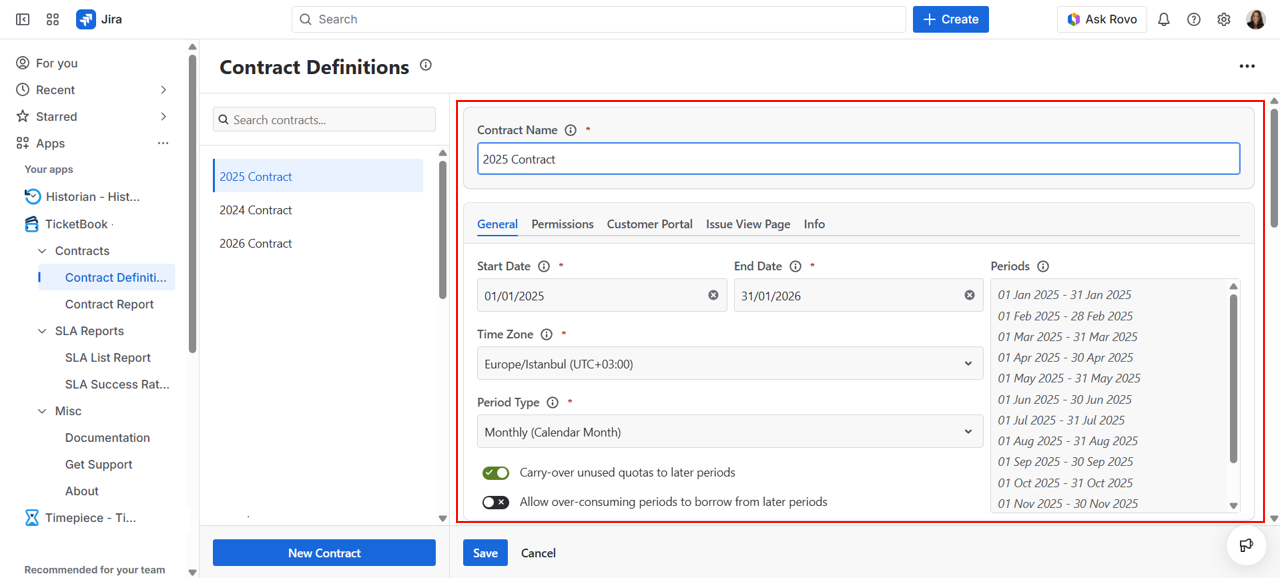
General Settings Tab
Contract Name
Every contract has a Name, which acts as its primary identifier. You can enter any name you prefer, typically something that clearly identifies the customer or vendor and the nature of the agreement, such as "Acme Corp - Monthly Support 2025".
TicketBook will use this name to reference the contract across all related screens, including the Contract Report and the customer portal panel.
Dates & Period Type
Each contract includes four key mandatory settings: Start Date, End Date, Time Zone, and Period Type.
The Start Date, End Date, and Time Zone define the full duration of your contract term. The time zone setting ensures that period boundaries are calculated correctly, which is especially important for teams working across multiple regions.
The duration between your Start Date and End Date will be divided into periods according to your Period Type selection. Each period is measured and reported independently in the Contract Report.
TicketBook supports the following Period Type options:
Fixed
The entire duration between the Start Date and End Date is treated as a single continuous period. This is useful for short-term or project-based contracts where you want to track total consumption over the full contract term rather than breaking it down by month or year.
Monthly (Calendar Month)
Each calendar month between the contract's Start and End Dates becomes a separate period. Periods always begin on the first day of each month. This is the most common option for recurring monthly support contracts.
Monthly (Exact Day)
Each month is treated as a separate period, starting on the same day of each month based on the contract's Start Date. For example, if the contract starts on the 15th, each period runs from the 15th of one month to the 14th of the next.
Annual (Calendar Year)
Each calendar year is processed as a separate period. New periods always begin on the 1st of January each year. This is suitable for annual contracts that align with the standard business year.
Annual (Exact Day)
Each year becomes a separate period, starting on the same day of the year as your contract's Start Date. For example, a contract starting on March 1st will have periods running from March 1st to the last day of February each year.
Carry Over & Over Consumption Settings
TicketBook provides two optional settings that control how unused or exceeded quotas are handled across contract periods. Both settings are unchecked by default.
These settings directly affect how quota usage and over-consumption are calculated in the Contract Report, ensuring accurate contract tracking based on your selected quota policy.
Carry-over unused quotas to later periods
When enabled, any unused quota from the current period is automatically transferred to the next period. This allows future periods to benefit from the remaining quota, and the total available quota for upcoming periods is increased accordingly.
For example, if a customer has a quota of 100 service hours per month but only uses 80 in January, the remaining 20 hours carry over to February, giving them 120 hours available that month. This continues to accumulate period after period until the end of the contract.
This setting is particularly useful for customers who prefer not to operate on a strict "use it or lose it" model, as it gives them more flexibility to manage their quota across the full contract term.
Allow over-consuming periods to borrow from later periods
When enabled, periods that exceed their assigned quota can borrow from the quota of upcoming periods. This allows the system to redistribute quota across periods and calculate over-consumption based on the remaining balance of the entire contract duration.
For example, if a team needs 110 service hours in a month but the limit is 100, the extra 10 hours are automatically deducted from the following period's quota, reducing it from 100 to 90. Work continues uninterrupted.
Both carry-over and borrowing settings can also be toggled temporarily on the Contract Report screen to preview how the report would look under different scenarios, without changing the actual contract configuration.
Historical Contracts
Contract reports are calculated solely using Jira issues and the SLA data already recorded on those issues. Because Jira stores this data historically, you can create contracts and generate reports for past issues as well, making it possible to retroactively track and report on service agreements that predated your use of TicketBook.