
This page explains how data moves between your Jira Cloud instance, your users' browsers, and the Timepiece cloud service when Timepiece is in use. Understanding this flow is important for security reviews, network configuration, and compliance assessments.
How Timepiece Works
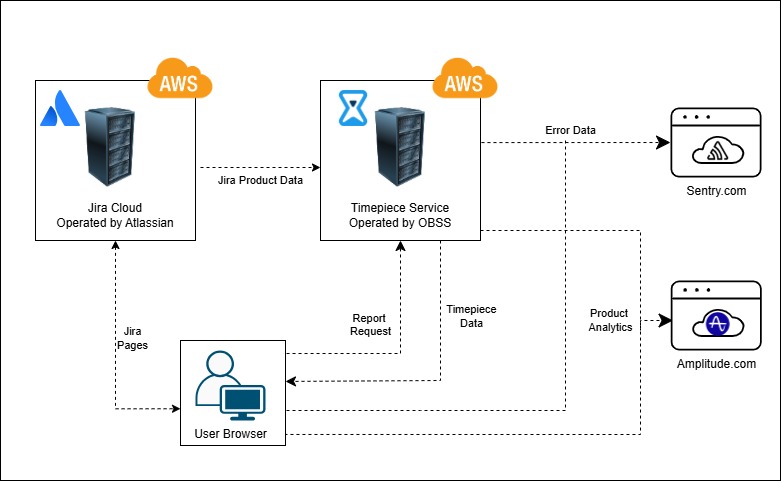
Timepiece is a cloud app that runs as an external service hosted by OBSS on Amazon Web Services (AWS). When a user opens a Timepiece report in their browser, the User Browser sends a Report Request directly to the Timepiece Service. The Timepiece Service then reads the necessary Jira Product Data from Jira Cloud (operated by Atlassian, also hosted on AWS) to generate the report. The completed Timepiece report data is then returned directly to the User Browser.
What Data Is Transferred
When a report is requested, Timepiece reads only the Jira issue data that is directly relevant to that specific report, including issue history records (status transitions and their timestamps), issue field values for fields included in the report, user account IDs associated with assignments and transitions, and project and sprint metadata needed to resolve filter parameters. Timepiece does not perform bulk reads or cache your entire Jira dataset.
Error Tracking and Product Analytics
The Timepiece Service sends Error Data to Sentry for error tracking and monitoring purposes. This allows the OBSS team to detect and respond to service errors proactively.
Both the Timepiece Service and the User Browser send Product Analytics data to Amplitude. This data is used by OBSS to understand how Timepiece features are used and to improve the product. No Jira Product Data is included in analytics events.
Data Storage and Retention
Timepiece does not permanently store your Jira Product Data. All issue data read from Jira is processed in memory to generate the report and discarded immediately once processing is complete. It is never written to a database or long-term storage.
The only exception is file exports, when a user requests an asynchronous file export, the generated file is temporarily stored on OBSS servers for 24 hours to allow the user to download it, after which it is automatically deleted.
Timepiece does store Settings Data specific to its own configuration, including custom calendars, access settings, format settings, and saved parameter sets. This Settings Data does not include any Jira Product Data and does not contain personally identifiable information. Only Atlassian user account IDs are stored, not usernames, email addresses, or display names.
Network Requirements
For Timepiece to function correctly, the following domains must be reachable from your users' browsers. If your organisation operates within a closed or restricted network, these addresses need to be whitelisted:
*.obss.io — the main Timepiece cloud service.
connect-cdn.atl-paas.net — hosts some of the static resources used by the Timepiece interface.
*.obss.tech — the domain used by support and documentation links within the Timepiece UI.
*.sentry.io — used for error monitoring, reporting, and support. Only anonymized data is sent and your Jira data is never included.
*.amplitude.com — used for product analytics. Only anonymized data is sent and your Jira data is never included.
marketplace.atlassian.com — used for some non-critical links in the Timepiece UI that redirect to the OBSS vendor page on Atlassian Marketplace. Not mandatory.
See Internet Access for the full domain list with details.
Privacy Policy
For full details on what categories of data OBSS collects, how long each type is retained, where it is stored, who has access to it, and your rights as a customer, see the Privacy Policy for OBSS Apps on Atlassian Cloud Platform.