
The Timepiece Custom Fields admin page is where you manage your existing Timepiece custom fields and observe their runs.
To create new Timepiece custom fields, see Creating and Configuring Custom Fields.
Custom Fields
The Custom Fields section lists all existing Timepiece custom fields in your Jira.
Timepiece custom fields with multiple contexts will be displayed with a sub-table displaying different contexts.
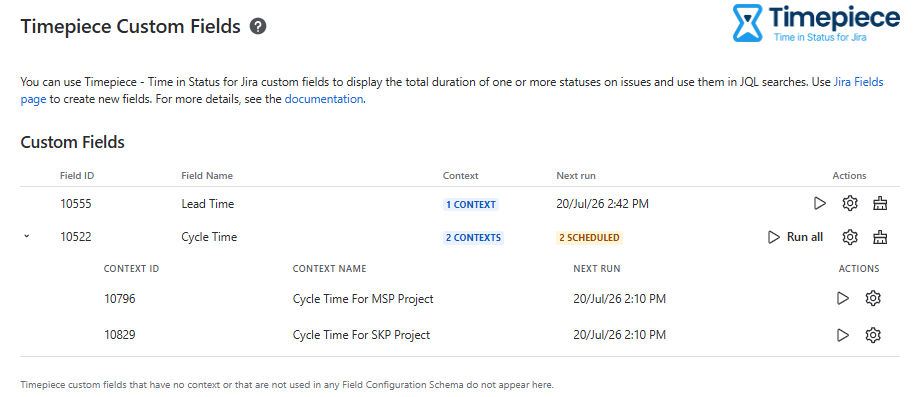
Timepiece custom fields appear here only after they are added to a Field Configuration schema and/or issue screens. If you don’t see a Timepiece custom field you created, make sure it is added to at least one Field Configuration schema.
The following actions are available for each field (and field context):
-
Run – Queues a run for this field (or field context) immediately.
-
Triggering a run using this button won’t affect scheduled runs.
-
-
Settings – Opens the Jira admin page to configure this Timepiece custom field.
-
This is a shortcut to Jira’s own custom field config page under the Fields admin page.
-
-
Clean Field Values – Performs a system-wide cleanup of this custom field’s values calculated before the selected date.
-
This action is mainly used to clear outdated values after you modify the field configuration.
-
This operates at the custom field level and applies to all contexts, including those created in the past. It cleans the values on issues even outside the current JQL filter configuration of your custom field.
-
Runs
The Runs section lists all calculation runs and cleanup operations of Timepiece custom field values (both scheduled and manual).
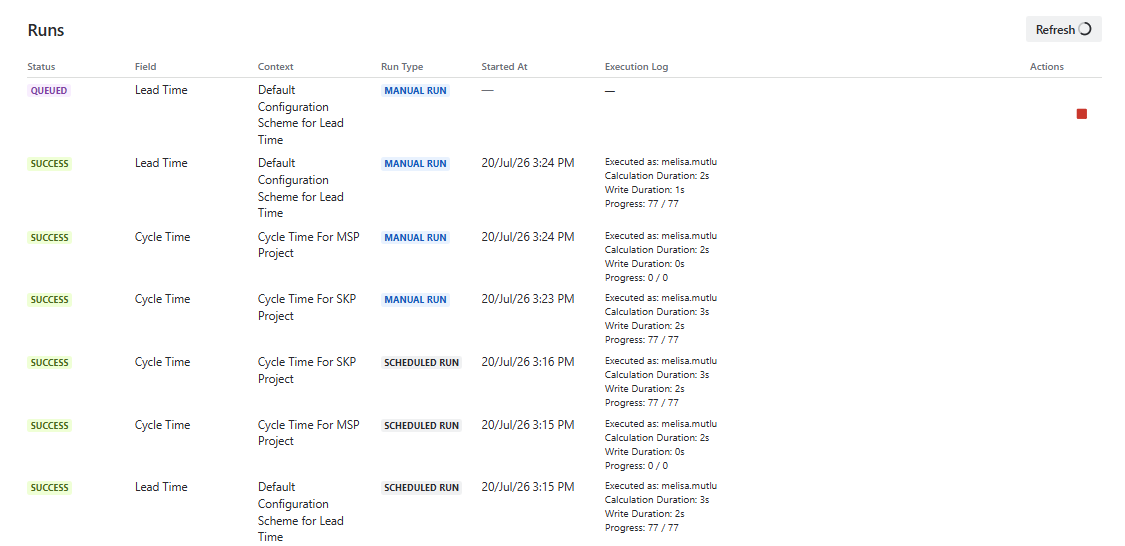
The table displays the following information for each run:
-
Status – The current state of the run.
-
Field – The custom field for which the run was executed.
-
Context – The context for which the run was executed.
-
You will see that multiple contexts of a single custom field are calculated separately.
-
-
Run Type – Indicates whether the run was triggered manually or automatically as a scheduled run.
-
Started At – The date and time the run started.
-
Execution Log – Displays details about the run, including the user it was executed as, calculation duration, write duration, and progress.
The Runs table auto-refreshes, but you can also refresh the list using the Refresh button.
Runs that have been started but are not yet completed can be aborted using the abort button in the Actions column.
Timepiece optimizes the calculation for issues that were not updated since the last run. As a result, the initial calculation of a custom field might take some time, but subsequent runs will be much faster.